Solicitor seat
Instructs, reviews, decides and signs off.
€119a month, billed yearly
€139 billed monthly. Plus VAT.
- All five use cases
- Precedents and deadlines
- Sign-off with two-factor authentication
- Client portal
For solicitors' practices of one to ten in Ireland.
A solicitor in your firm reviews, decides and signs off.
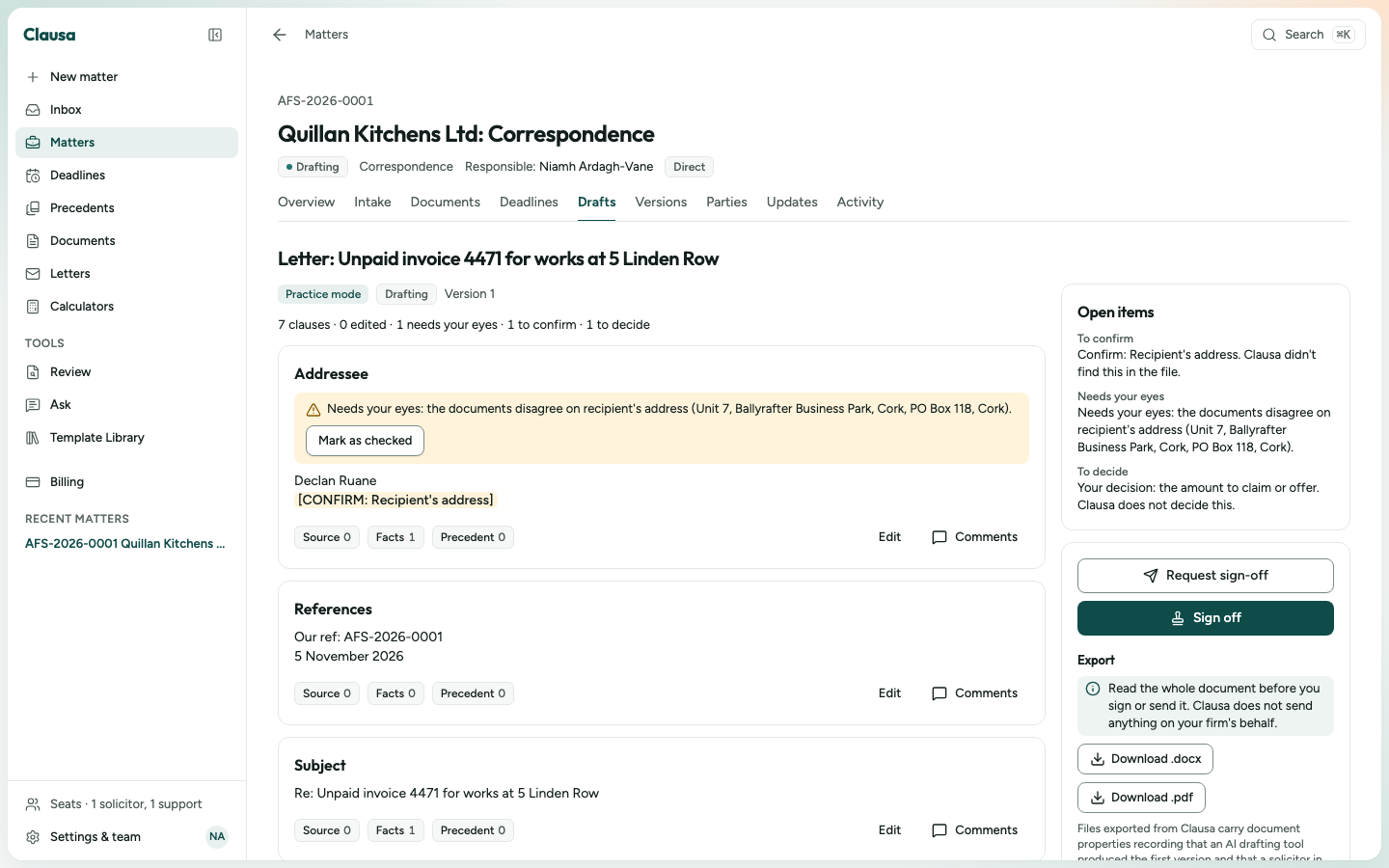
Clausa writes the first version from the file, tracks every deadline with its rule, and drafts from the precedents your firm already has.

Pick the use case, add the client, run the conflict check, upload the file. Every fact is extracted with the page it came from.

Clausa drafts only after a solicitor records what to seek, what to admit and the points to make. Each rule carries its section. Each point for your decision is marked.

Read to the end, tick the checklist, sign off with two-factor authentication. Export .docx and .pdf on your letterhead.

Clausa never decides, never signs and never sends.
From the complaint form and the employer's file to a full written submission, with the time limits of the 2015 Act.
See how it works
Chronology, rent table with the arithmetic shown, notice checklist, written submission and index of evidence.
See how it worksLetter before action, claim notice with the Rules' forms, judgment in default. Each step waits for your decision.
See how it works
A table of every document, a chronology with page references, a one-page summary and a paginated bundle.
See how it works
Letters on your precedents, in the tone you choose. Nothing "without prejudice" leaves without your decision.
See how it worksEach use case switches on for your firm only after a solicitor in your firm reviews its templates. This list is what exists today.
Upload the folder once. Clausa splits it into clauses, masks personal data and proposes tags. A solicitor approves each precedent before the engine uses it.

Deadlines come from the file and from the Irish rules Clausa cites. Each shows the rule, the source and the anchor date, and starts unconfirmed.

Invite a client by link. They answer the intake for their use case, attach what they have and read the updates you approve.
Your firm's name on the page and in every e-mail, with your firm's reply-to address.
Your firm uses Clausa, a drafting software that uses artificial intelligence. Everything you receive here was reviewed and approved by a solicitor in your firm. Your information is processed in the EU and is not used to train AI models.
Your firm's client portal, powered by Clausa
Defences, admissions, offers, who gives evidence: each one waits for a solicitor.
Clausa writes the gap into the draft and hands the clause to you.
Two-factor authentication and the whole document read. The version is locked with its hash; editing creates a new version.
Nothing of Clausa in the body of the document. The file opens clean in Word and goes wherever your files live.
Processed in the EU. Never used to train AI models. Your firm controls retention.
Billed yearly or monthly. Plus VAT, added at checkout. No minimum beyond one solicitor seat.
Instructs, reviews, decides and signs off.
€119a month, billed yearly
€139 billed monthly. Plus VAT.
For trainees, legal executives and secretaries.
€39a month, billed yearly
€49 billed monthly. Plus VAT.
Sole practitioner and one secretary
€158
a month
Three solicitors and one secretary
€396
a month
Six solicitors and three support
€831
a month
Examples billed yearly, plus VAT.
Your practice pays for the software. Nothing in the price is linked to clients, referrals or outcomes.
Your practice management system runs your matters, time and accounts. Clausa drafts the piece from the file and holds the version you signed.
| Feature | Clausa | Practice management | Research and drafting assistants | Firm-wide AI platforms |
|---|---|---|---|---|
| What it is for | First drafts, deadlines and sign-off for five Irish use cases | Matters, time, billing, accounts, forms | Research and drafting on a publisher's library | AI across a large firm |
| Irish legislation quoted word for word, checked outside the model | Yes | Not stated | Not stated | Not stated |
| WRC, RTB and District Court debt as built workflows | Yes | Forms and precedents | Not stated | Not stated |
| Sign-off with checklist and version hash | Yes | Not stated | Not stated | Not stated |
| Price on the page, no minimum seats | Yes | Varies | Varies | Varies |
| Replaces your accounts and billing | No | Yes | No | No |
Based on what each kind of software says about itself. "Not stated" means we found no public statement.
Clausa is new, so there are no customers to quote. Here is what every draft carries instead.
Workplace Relations Act 2015, s. 41(6)
Source: Irish Statute Book, revised text of the Law Reform Commission.
Revised to the date it was checked
Source: the version date of each Act, shown beside every quote.
Version 4 · hash 2c0b8df2d4b3
Source: the sign-off window of the example matter above.
Example values. Names of firms appear here only with their written approval.
No. Clausa is software used by solicitors' practices. It does not act for anyone and does not advise the public. The solicitor in your firm who signs off is responsible for the work.
The solicitor who signs off, as with any tool. Clausa's contract carries its own liability for the software and a data processing agreement, both for your solicitor to read.
Irish legislation and official guidance only, with the version date. Every quote is matched word for word against the Act before you see it. No case law.
The clause is marked "No source". You write it yourself or remove it. Clausa will not sign off a legal statement it cannot link to its source.
Only a member with the solicitor role, a current roll number and two-factor authentication, after reading to the end. Trainees and secretaries prepare; a solicitor signs.
No. You export and send from your own systems. Client updates are drafted for your approval and copied into your own e-mail.
Processed in the EU under a data processing agreement. Never used to train AI models. Your firm sets retention and can export or delete everything.
No. Support access needs your written consent, lasts 24 hours and is recorded in the matter's activity.
€119 per solicitor seat a month billed yearly, or €139 monthly. Support seats €39 or €49. Plus VAT. No setup fee.
No. Clausa works alongside it. Your export opens clean in Word and goes into your file as any document.
Ask your insurer in writing. Clausa gives you a one-page description of the tool to send, in the pack for your firm.
Book a demo. It opens your firm's account, and we go through your own kind of matter with you.